
Looking for a FinArt alternative that stays free?
Automatic tracking is useful. So is knowing what renewed, what you spent and which refund is still waiting. Try Numero's free plan before deciding whether FinArt's paid plan is right for you.
- Understand your purchases
- Keep track of subscriptions
- Follow your refunds
Free ongoing expense tracking. No bank login. Optional paid extras.
Compare all four appsTry it with your history.
Keep using it for free.
- Initial SMS sync
- 6 months
- Import up to 6 months of available bank transaction SMS for free on supported Android builds.
- Initial email sync
- 30 days
- Start with the last 30 days from one connected Gmail or Outlook account.
- Your ongoing history
- Keeps growing
- Keep using Numero for free. New activity keeps adding to your saved history.
Which FinArt alternative fits your routine?
Compare what you would use on an ordinary day, not just a list of features. FinArt has its own strengths, including notification capture and subscription tracking. Here is where Numero and the other options fit.
Tap a question to compare all four apps.
How do my expenses get in?
- Numero
- Supported Android bank SMS, Gmail or Outlook, and expenses you add yourself.
- FinArt
- Transaction SMS, email and app notifications, plus expenses you add yourself.
- Wallet by BudgetBakers
- Add expenses, import records or connect a supported bank with Premium.
- axio / Walnut
- Bank transaction SMS feeds spending, budget and bill tracking.
What was that payment for?
- Numero
- Connect receipts, order references and related updates to purchases when those details are available.
- FinArt
- Uses SMS, email and app notifications to organize transactions and show spending categories.
- Wallet by BudgetBakers
- Organize bank records or add details yourself. Connecting email receipts to purchases was not verified.
- axio / Walnut
- Add categories, notes, tags and receipt photos. Connecting email receipts to purchases was not verified.
What am I paying for regularly?
- Numero
- See plans, charges and renewal dates found in your messages, together in one place.
- FinArt
- Advertises subscription tracking for services such as Netflix, Prime and Spotify, plus bill reminders.
- Wallet by BudgetBakers
- Schedule planned payments. Automatic subscription detection from messages was not verified.
- axio / Walnut
- Bill and payment reminders are listed. Grouping subscription plans was not verified.
Did my refund come back?
- Numero
- Follow related refund updates. Keep a refund being started separate from evidence that money arrived.
- FinArt
- Following a purchase through to money back was not verified in the sources checked.
- Wallet by BudgetBakers
- Following a purchase through to money back was not verified in the sources checked.
- axio / Walnut
- Following a purchase through to money back was not verified in the sources checked.
Can I ask about my spending?
- Numero
- Ask "How much did I spend at Amazon last month?" Three Ask Numero questions a month are free.
- FinArt
- See spending by category. Asking questions in chat was not verified.
- Wallet by BudgetBakers
- See budgets and cash flow. Asking questions in chat was not verified.
- axio / Walnut
- Search expenses, tags and notes. Asking questions in chat was not verified.
What can I use for free?
- Numero
- Free ongoing tracking and budgets. Start with up to 6 months of SMS and 30 days of email history.
- FinArt
- A 5-day trial, then paid access. Check annual and lifetime offers in the app.
- Wallet by BudgetBakers
- Manual tracking is free. Bank sync requires Premium, with a lifetime option also advertised.
- axio / Walnut
- Check the current tracking terms in the app. Credit and deposit products have separate terms.
When would I pick this app?
- Numero
- You want to understand purchases, keep up with subscriptions and follow refunds without connecting a bank.
- FinArt
- You like automatic message tracking and want notification capture or a family setup.
- Wallet by BudgetBakers
- You want bank feeds, imports or a wider view that includes investments and shared finances.
- axio / Walnut
- You want SMS expense tracking and also use axio's other financial services.
What should I check first?
- Numero
- Missing messages can leave gaps. AI Insights and receipt capture are paid. SMS is Android-only.
- FinArt
- Check the features on your device and what Private Mode does before choosing it.
- Wallet by BudgetBakers
- Check support for your bank and account before paying for sync.
- axio / Walnut
- Check whether the tracking suits you. Credit and deposit products have separate terms.
“Not verified” means we could not confirm that feature from the sources we checked, not that the app cannot do it. FinArt also tracks subscriptions and works without a bank login; Wallet can be used without bank sync. View official sources.
FinArt vs Numero: what actually changes?
Both apps can track SMS and email without a bank login. The useful differences are how you pay, what you capture, where your data goes and how you share it.
Want to keep tracking without paying for a plan?
- Numero
- Keep tracking expenses, subscriptions and refunds for free. Budgets and three spending questions a month are included too.
- FinArt
- Its listing advertises a 5-day trial. The Android FAQ lists annual and lifetime options, with current prices shown in the app.
Where do your spending details arrive?
- Numero
- Use supported Android bank SMS and a Gmail or Outlook inbox. Add cash yourself; receipt capture is an optional paid feature.
- FinArt
- Also captures SMS and email without bank login, plus app notifications. Verify the setup available on your device.
Want your records to stay only on your phone?
- Numero
- SMS text is processed on your phone, but the financial details are synced to your Numero account. It is not a local-only app.
- FinArt
- Its Android policy says Private Mode keeps SMS text and transaction information on-device, but occasionally sends sender and merchant information.
Already have a family setup that works?
- Numero
- Free includes one connected inbox and calendar-month budgets. Family Sharing is in beta on Premium, not part of the free plan.
- FinArt
- Its Android FAQ describes a yearly family plan for two devices and a custom month start day. These may be reasons to keep FinArt.
When keeping FinArt makes sense
If its notification capture, Private Mode or family setup already works for you, a paid plan may be worth keeping. Try Numero for its free ongoing tracking and spending questions, not because every FinArt feature has an identical replacement.
Keep tracking after the first five days.
With Numero, you do not have to make a buying decision after a short trial. Start with up to 6 months of available Android bank SMS and 30 days from one inbox. Keep using the free plan, and your saved history keeps growing.
Use Numero for a year, and your recorded activity can span that year. The initial sync windows do not turn into rolling deletion limits.
Included in Free
- Free ongoing expense tracking, budgets and search
- One Gmail or Outlook inbox, supported Android bank SMS and manual entries
- Subscription and refund tracking from your recorded messages
- Three Ask Numero questions per month, with optional paid upgrades
Less time piecing things together.
A charge tells you money moved. The receipt, renewal notice or refund update helps explain what happened next. Numero puts those details to work so you can ask about your month instead of opening each message.
"What was that charge for?"
An amount and a shop name can leave you guessing. Bring receipts, order references and related updates together when your messages include them.
See how expenses come together"Am I still paying for this?"
See the plans, charges and renewal dates Numero has found. Review the latest updates instead of assuming an old receipt means a plan is still active.
Explore subscription tracking"Did that refund ever arrive?"
A refund email is not always money back. Follow related updates and see the difference between a refund being started and evidence that it arrived.
Explore refund tracking"Where did my money go?"
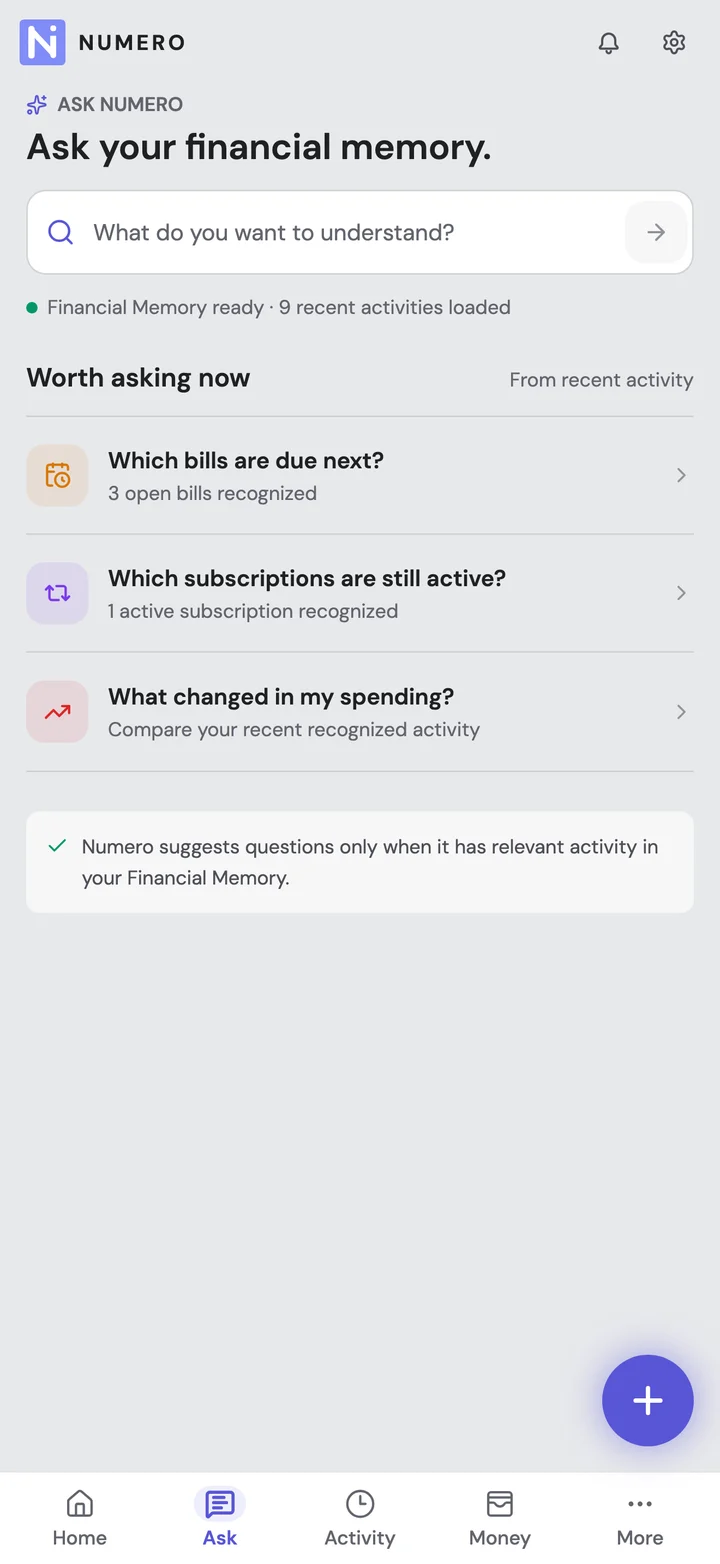
Ask about recorded purchases, shops and amounts in plain language. Start with three questions a month for free; each follow-up uses one question.
See what you can askNumero can only answer from what it has recorded. Missing messages or unrecorded cash can leave gaps, and item-by-item purchase details are not guaranteed.
Try Numero alongside FinArt first.
- 01
Keep your FinArt backup. Do not remove the app or your old records just to try something new.
- 02
Start from your messages. A direct FinArt backup import has not been verified, so do not expect all your old records to move across.
- 03
Check a few familiar purchases. Include a subscription, cash entry and refund. If you rely on notification capture, test that difference before switching.
- 04
Decide after you have tried it. Review any FinArt plan separately; installing Numero does not cancel another subscription.
A few things worth knowing
Numero offers an ongoing free plan for SMS and email-based expense tracking, budgets and manual entries. It includes one connected inbox and three Ask Numero questions per month. Wallet also offers free manual tracking, while its bank synchronization is a Premium feature.
FinArt's Google Play listing advertises a 5-day free trial. Its Android FAQ describes paid plans after the trial, including annual and lifetime options. Check the current offers in your app; a lifetime option is different from a recurring subscription.
No. The free initial sync covers 30 days of email and up to 6 months of SMS. These are lookback windows for importing old messages, not rolling limits on saved data. New activity keeps adding to your history as you continue using Numero for free.
Yes. FinArt's official listing describes SMS, email and app-notification capture without a bank login. Numero also uses SMS and authorized email accounts, so no-bank-login tracking is not an exclusive Numero feature.
Do not assume they are equivalent. Numero processes SMS on the phone and syncs extracted financial facts. FinArt's Android policy describes Private Mode as keeping SMS text and transaction information on-device, while occasionally transmitting sender and merchant information. Read the settings and policies for your chosen workflow.
We have not verified a direct import. Keep your FinArt backup. Numero can read the available SMS and email history you authorize, but that does not bring over your complete FinArt database.
Keep FinArt if its notification capture, Private Mode, household setup or custom month start already fits your needs and its pricing works for you. Numero is an alternative, not a guaranteed replacement for every FinArt workflow.
You can ask about purchases, merchants and amounts that Numero has recorded. Receipts and order updates can add useful context, but we do not promise an item-by-item list of everything you bought. The answer depends on the details available in your connected sources and saved records.
Yes. Free includes tracking for subscriptions and refunds found in your messages, plus three Ask Numero questions each month. Each follow-up counts as a question. AI Insights and receipt capture are optional paid extras. A past receipt does not prove a plan is still active, and a refund initiation email does not prove the money arrived.
How we compared
Published by Numero, which is included in this comparison. FinArt's official app listing, Android FAQ and privacy policy were checked on 20 October 2026, alongside Wallet and axio's official pages. This is a documentation-based comparison, not a hands-on performance test. Platform features and in-app prices may differ.