
Looking for a Walnut (axio) alternative?
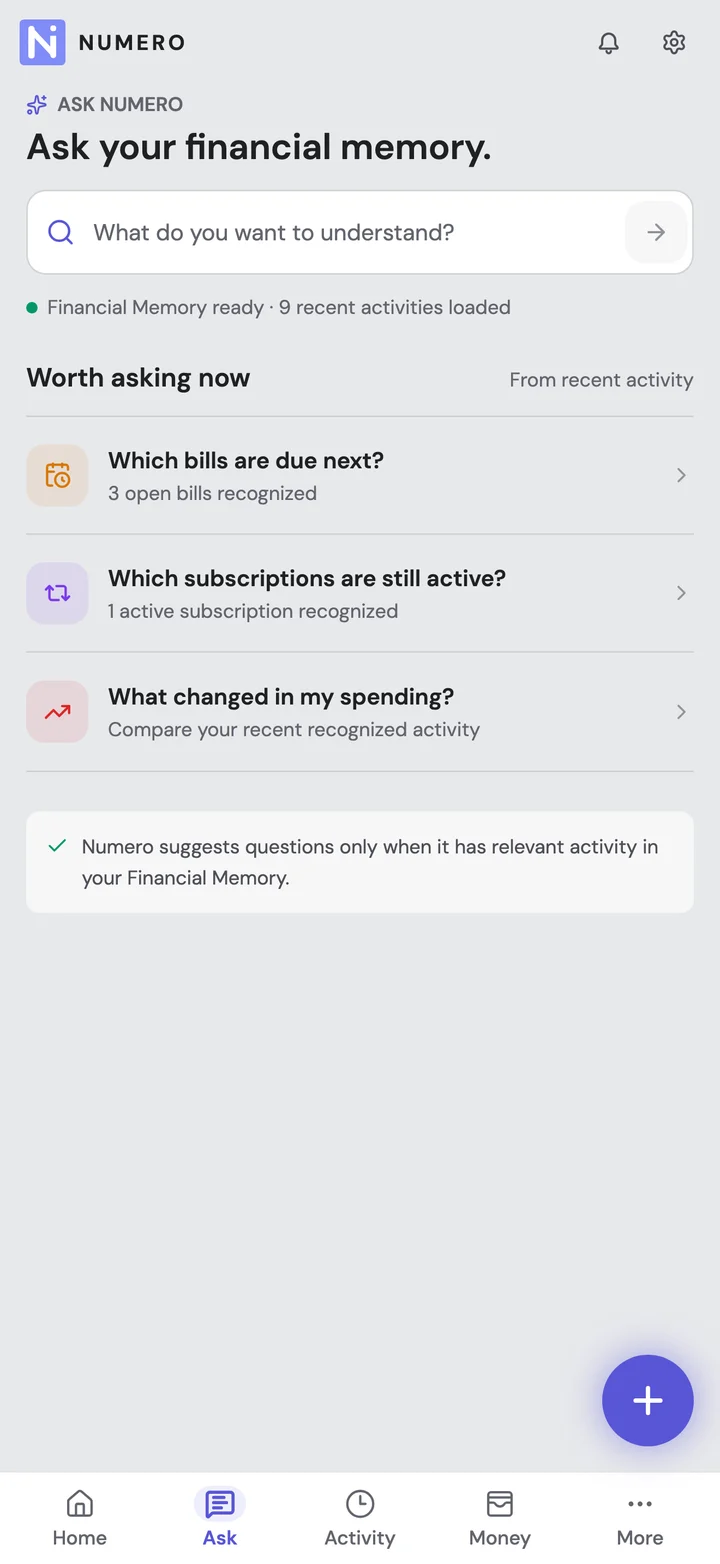
You know money left your account. Remembering what it was for can be harder. Try Numero to bring purchases, subscriptions and refund updates together, then ask questions about your month.
- Understand your purchases
- Keep track of subscriptions
- Follow your refunds
Free ongoing expense tracking. No bank login. Optional paid extras.
Compare all four appsTry it with your history.
Keep using it for free.
- Initial SMS sync
- 6 months
- Import up to 6 months of available bank transaction SMS for free on supported Android builds.
- Initial email sync
- 30 days
- Start with the last 30 days from one connected Gmail or Outlook account.
- Your ongoing history
- Keeps growing
- Keep using Numero for free. New activity keeps adding to your saved history.
Compare your options
Start with the questions you want your app to answer. Numero brings purchases, subscriptions and refund updates together. FinArt also tracks subscriptions; Wallet offers bank feeds; axio may already cover the SMS tracking you need.
Tap a question to compare all four apps.
How do my expenses get in?
- Numero
- Supported Android bank SMS, Gmail or Outlook, and expenses you add yourself.
- FinArt
- Transaction SMS, email and app notifications, plus expenses you add yourself.
- Wallet by BudgetBakers
- Add expenses, import records or connect a supported bank with Premium.
- axio / Walnut
- Bank transaction SMS feeds spending, budget and bill tracking.
What was that payment for?
- Numero
- Connect receipts, order references and related updates to purchases when those details are available.
- FinArt
- Uses SMS, email and app notifications to organize transactions and show spending categories.
- Wallet by BudgetBakers
- Organize bank records or add details yourself. Connecting email receipts to purchases was not verified.
- axio / Walnut
- Add categories, notes, tags and receipt photos. Connecting email receipts to purchases was not verified.
What am I paying for regularly?
- Numero
- See plans, charges and renewal dates found in your messages, together in one place.
- FinArt
- Advertises subscription tracking for services such as Netflix, Prime and Spotify, plus bill reminders.
- Wallet by BudgetBakers
- Schedule planned payments. Automatic subscription detection from messages was not verified.
- axio / Walnut
- Bill and payment reminders are listed. Grouping subscription plans was not verified.
Did my refund come back?
- Numero
- Follow related refund updates. Keep a refund being started separate from evidence that money arrived.
- FinArt
- Following a purchase through to money back was not verified in the sources checked.
- Wallet by BudgetBakers
- Following a purchase through to money back was not verified in the sources checked.
- axio / Walnut
- Following a purchase through to money back was not verified in the sources checked.
Can I ask about my spending?
- Numero
- Ask "How much did I spend at Amazon last month?" Three Ask Numero questions a month are free.
- FinArt
- See spending by category. Asking questions in chat was not verified.
- Wallet by BudgetBakers
- See budgets and cash flow. Asking questions in chat was not verified.
- axio / Walnut
- Search expenses, tags and notes. Asking questions in chat was not verified.
What can I use for free?
- Numero
- Free ongoing tracking and budgets. Start with up to 6 months of SMS and 30 days of email history.
- FinArt
- A 5-day trial, then paid access. Check annual and lifetime offers in the app.
- Wallet by BudgetBakers
- Manual tracking is free. Bank sync requires Premium, with a lifetime option also advertised.
- axio / Walnut
- Check the current tracking terms in the app. Credit and deposit products have separate terms.
When would I pick this app?
- Numero
- You want to understand purchases, keep up with subscriptions and follow refunds without connecting a bank.
- FinArt
- You like automatic message tracking and want notification capture or a family setup.
- Wallet by BudgetBakers
- You want bank feeds, imports or a wider view that includes investments and shared finances.
- axio / Walnut
- Your familiar SMS tracker works for you, or you also use its other financial services.
What should I check first?
- Numero
- Missing messages can leave gaps. AI Insights and receipt capture are paid. SMS is Android-only.
- FinArt
- Check the features on your device and what Private Mode does before choosing it.
- Wallet by BudgetBakers
- Check support for your bank and account before paying for sync.
- axio / Walnut
- You do not have to switch if it already does what you need.
“Not verified” means we could not confirm that feature from the sources we checked, not that the app cannot do it. FinArt also tracks subscriptions and works without a bank login; Wallet can be used without bank sync. View official sources.
Free to start. Free to keep tracking.
You do not need to pay just to keep using Numero. Start with up to 6 months of available SMS on Android and 30 days from your connected inbox. Keep using it, and your saved history keeps growing.
Use Numero for a year, and your recorded activity can span that year. The initial sync windows do not turn into rolling deletion limits.
Included in Free
- Supported Android bank SMS and one Gmail or Outlook inbox
- Subscription and refund tracking from your recorded messages
- Monthly and category budgets, search and manual entries
- Three Ask Numero questions per month
Your expenses have a story. See more of it.
The payment, the receipt and the refund email often arrive separately. Numero helps bring those details together, so you have less searching to do when you want an answer.
"What was that charge for?"
An amount and a shop name can leave you guessing. Bring receipts, order references and related updates together when your messages include them.
See how expenses come together"Am I still paying for this?"
See the plans, charges and renewal dates Numero has found. Review the latest updates instead of assuming an old receipt means a plan is still active.
Explore subscription tracking"Did that refund ever arrive?"
A refund email is not always money back. Follow related updates and see the difference between a refund being started and evidence that it arrived.
Explore refund tracking"Where did my money go?"
Ask about recorded purchases, shops and amounts in plain language. Start with three questions a month for free; each follow-up uses one question.
See what you can askNumero can only answer from what it has recorded. Missing messages or unrecorded cash can leave gaps, and item-by-item purchase details are not guaranteed.
Try it first. You do not have to leave Walnut today.
- 01
Keep your old records. Save an export or backup from axio if your version offers one. There is no need to uninstall it yet.
- 02
Start with your messages. Turn on supported Android SMS tracking or connect an inbox. A direct import from axio has not been verified.
- 03
Pick a few purchases you remember. Check a card payment, a subscription and a refund against your own records.
- 04
Keep the app that helps you most. Missing messages can leave gaps, and staying with axio is fine if it fits your routine.
A few things worth knowing
Numero has an ongoing free plan for expense tracking and budgets. Initial sync includes up to 6 months of SMS and 30 days of email from one connected account. New activity keeps adding to your saved history as you continue using the app. Advanced AI features and receipt capture are available on paid plans.
No. These are initial sync windows, not rolling limits on your saved history. The 30-day window applies to email and the 6-month window to SMS. Your record can span more months as you continue using Numero.
The official axio listing identifies Walnut as a former brand name. It still describes SMS expense tracking and budgets, alongside Pay Later, personal loans and fixed deposits.
Not through a migration we have verified. Keep an export or backup if axio offers one. Numero can start from the SMS and email history available to it, but that is not the same as bringing over your old app's records.
No. Numero uses supported Android bank SMS, a Gmail or Outlook inbox you connect, and expenses you add yourself. FinArt also works without bank login. Wallet's bank sync is optional; you can use it manually instead.
No app should be assumed to capture everything. Numero depends on supported messages, connected sources and entries you add. Missing messages or unrecorded cash expenses can leave gaps; it is not a complete bank ledger.
You can ask about purchases, merchants and amounts that Numero has recorded. Receipts and order updates can add useful context, but we do not promise an item-by-item list of everything you bought. The answer depends on the details available in your connected sources and saved records.
Yes. Free includes tracking for subscriptions and refunds found in your messages, plus three Ask Numero questions each month. Each follow-up counts as a question. AI Insights and receipt capture are optional paid extras. A past receipt does not prove a plan is still active, and a refund initiation email does not prove the money arrived.
How we compared
Published by Numero, which is included in this comparison. Competitor information was checked against official websites and app listings on 20 October 2026. This is a documentation-based comparison, not a hands-on performance test. Features and pricing can change.